A holiday in Bali
Use maps, message your driver and share your trip. A 30-day eSIM BaliEasy plan gives you a local connection for a short visit.

Sort out your mobile connection before your Bali adventure. Here’s how to choose a plan, install your eSIM and get connected with eSIM BaliEasy.
An eSIM is a digital SIM installed on your phone. You can buy one online before travelling, or arrange one after you arrive. First, decide whether you want mobile data only or a local Indonesian connection.
Ride-hailing, food delivery, cashless pay, or calling your villa and favourite guides: there are times when you need a real local number, not just data. A Telkomsel eSIM via eSIM BaliEasy gives you an Indonesian +62 number as well as mobile internet, for local calls and services that ask for local-number verification.
Use your data for maps and messaging, your local number to stay in touch with drivers and hosts, and the included call allowance when you need to reach someone directly. App verification and payment-account eligibility follow each service’s requirements.
Use maps, message your driver and share your trip. A 30-day eSIM BaliEasy plan gives you a local connection for a short visit.
Staying for two or three months? Compare the 60-day and 90-day plans at the bottom of this page, including their regional data allowances.
eSIM BaliEasy’s Telkomsel tourist eSIM includes a +62 phone number and a call allowance. Check the product details for the included benefits.
eSIM BaliEasy offers Telkomsel as its local mobile provider. Telkomsel is a strong choice for travelling around Indonesia, with extensive signal coverage and fast mobile internet for your everyday travel needs.
As an Authorized Telkomsel Outlet/Reseller, eSIM BaliEasy helps you through the required registration and activation process. You have a local team to turn to if installation, activation or your connection needs troubleshooting.
Our customer service team responds quickly through WhatsApp and email. From choosing your plan to getting connected in Bali, help is close at hand.
Get to know eSIM BaliEasy →Coverage and speed depend on your location, device and network conditions. You can also visit an eSIM BaliEasy store in Bali for in-person help.
Your phone needs eSIM support and must be carrier-unlocked. Compatibility varies by model and country of purchase. Check your phone here.
Prepare a clear passport photo, an unedited IMEI screenshot and a screenshot showing your installed eSIM and its device information. The KYC form also asks for a verification selfie, flight and arrival details. Follow the form linked in your order email.
Confirm that your exact phone model supports eSIM and is unlocked. If you’re unsure, use our compatibility guide before paying.
Compare data, coverage and validity in the product cards below. Choose a 30-day plan for a holiday, or a 60-day or 90-day option for a longer stay.
On the homepage, select a Telkomsel SIMPATI eSIM plan and click Buy Now. Check the product and quantity in your cart, then click Proceed to Checkout. Enter your full name, arrival date, phone/WhatsApp and email address. Check your details and complete payment through the available payment gateway.
After successful payment, a KYC Form email is sent automatically to the customer email address entered at checkout. Check your inbox and spam folder for a message from esim@balieasy.com. Use the KYC link associated with your own order and eSIM.
If you’re already in Bali or arriving within three days, eSIM BaliEasy sends the QR code automatically by email after purchase. For arrivals more than three days away, the QR email is scheduled for three days before arrival. Check your spam folder too.
Follow the instructions in your email and add the eSIM to the phone you’ll use in Bali. Label it “eSIM BaliEasy” so it’s easy to recognise. Keep the profile installed while you complete verification.
Open the KYC link in your post-payment email and follow the instructions. Upload your passport photo, the requested IMEI/device screenshots and verification selfie, then complete your flight and arrival information. Each eSIM needs its own form using the correct order and phone details. Preview the form requirements.
Once your KYC is verified and your IMEI is registered, eSIM BaliEasy’s activation process connects your eSIM on arrival. Turn on the eSIM and select it for mobile data. Follow your order instructions for any additional settings.
You can still order online. After installing your eSIM and submitting KYC, contact eSIM BaliEasy if you need help with activation.
Get Activation Help on WhatsAppThese screenshots show the eSIM BaliEasy purchase flow. Prices and availability may change; check the current product details before paying.
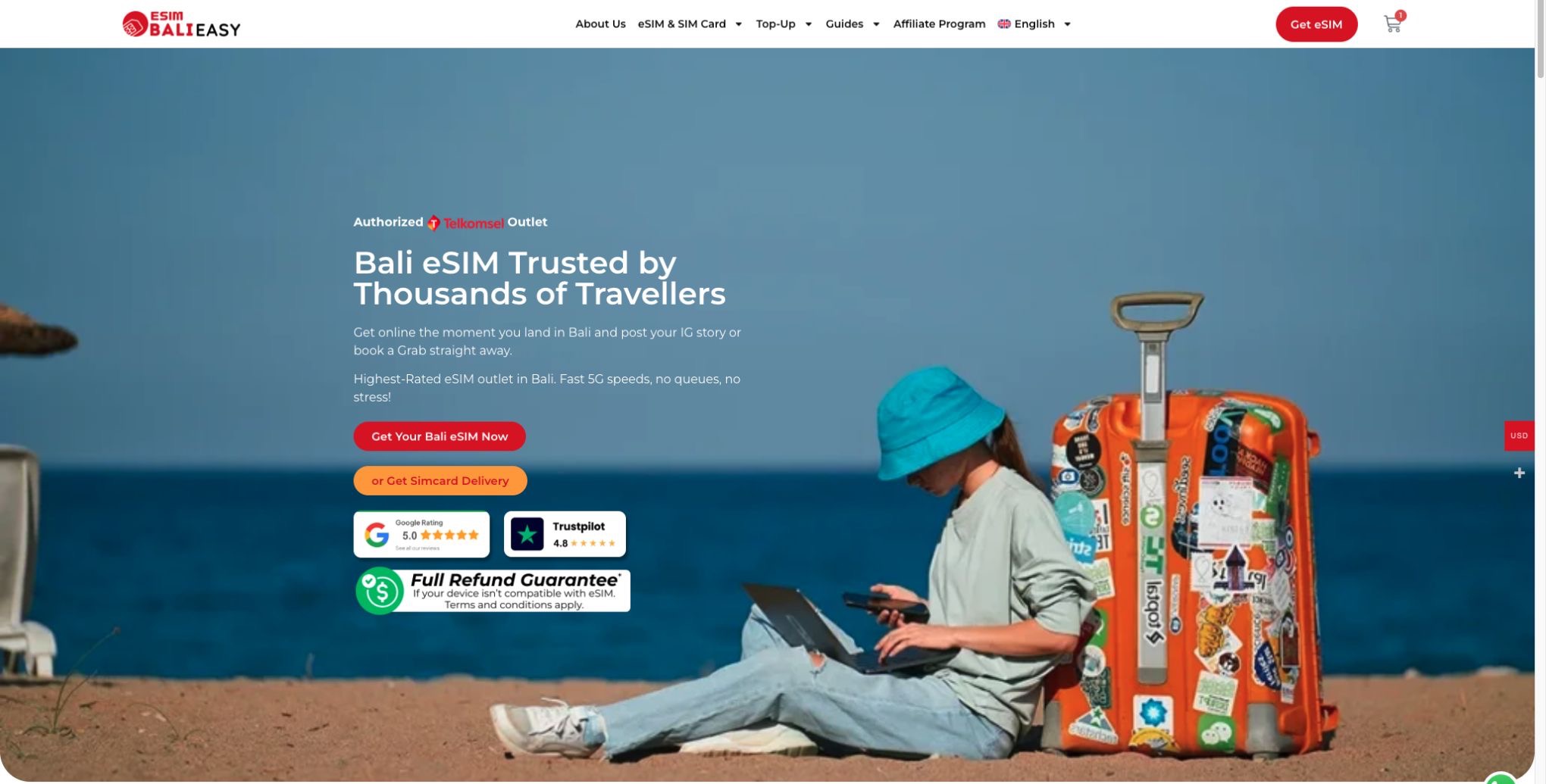
Open esim.balieasy.com and choose Get Your Bali eSIM Now to reach the plan selection.
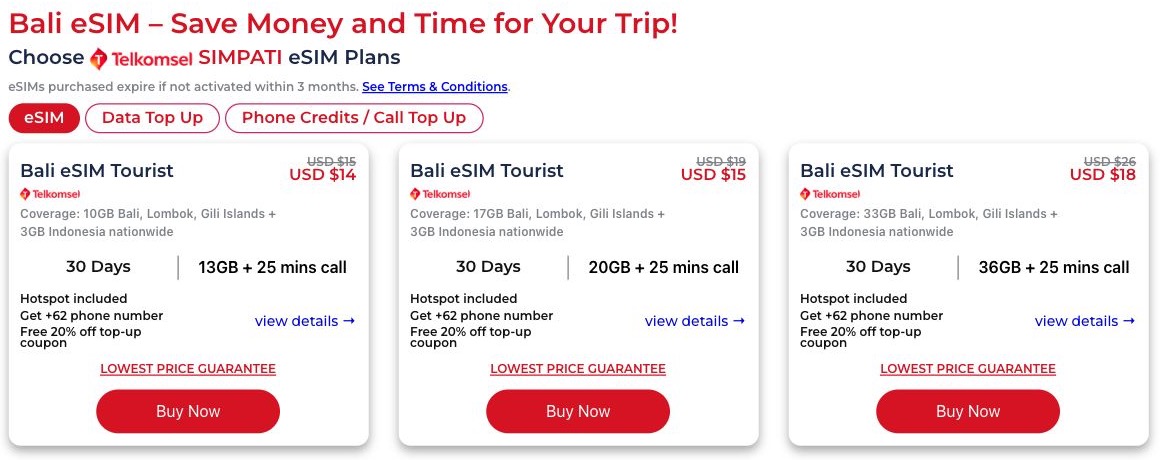
Select the eSIM tab, compare data and validity, then click Buy Now on your chosen plan. The screenshot shows example plans, not data top-ups.
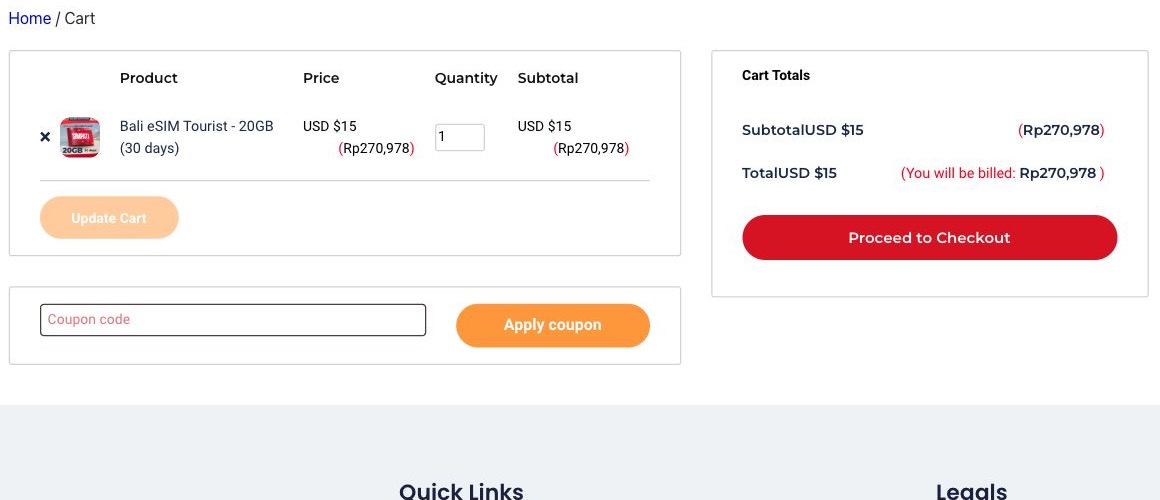
Confirm the selected eSIM and quantity, then click Proceed to Checkout.
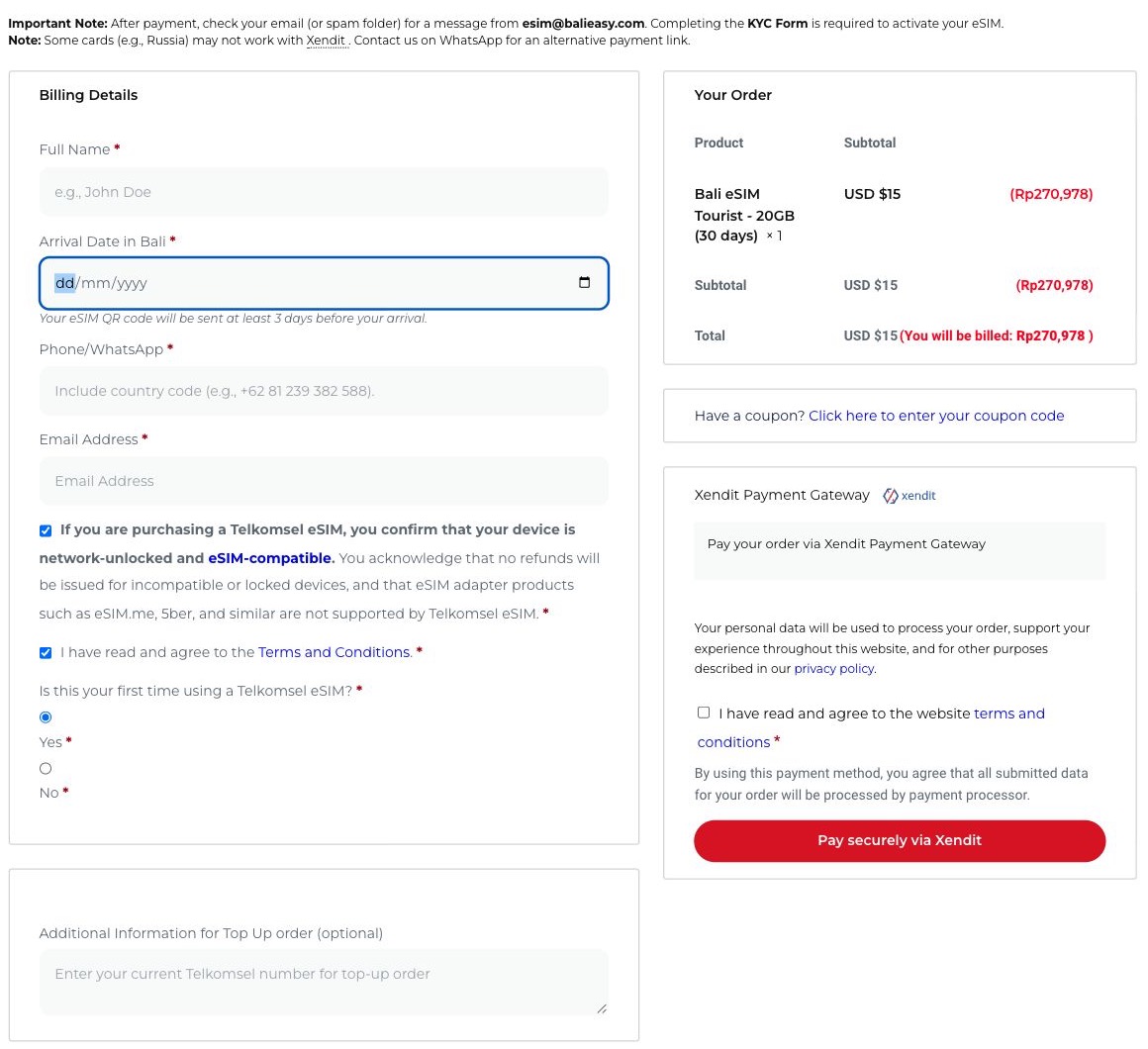
Use an email address you can access: your KYC Form email is sent automatically to this address after successful payment. Check your arrival date, phone and order total, read the terms, and use the available payment gateway.
The screenshots below show the blank form instructions. Use the link sent with your own order and submit genuine, clear and unedited documents. Never use the website’s example documents for your submission.
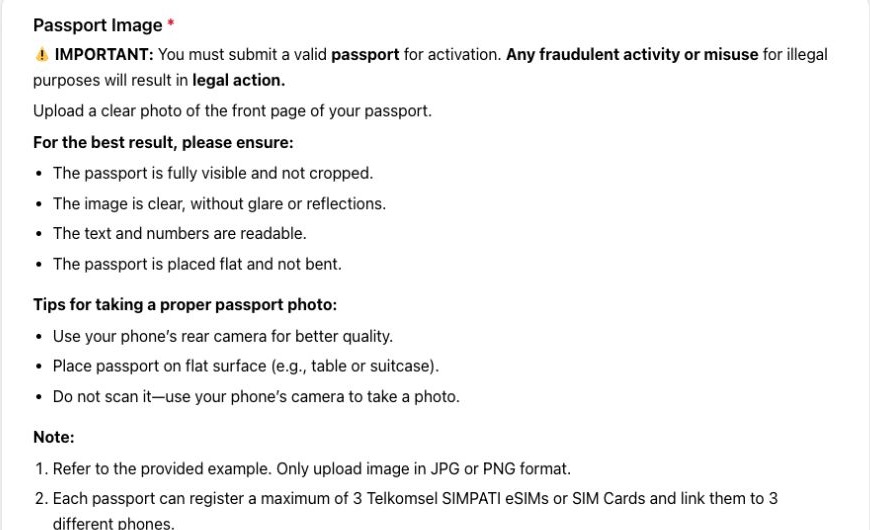
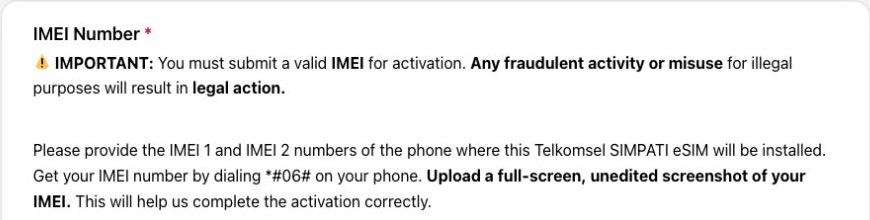
The form also requests an eSIM compatibility screenshot, device model, verification selfie and arrival details. Read the eSIM BaliEasy privacy policy before submitting your information.
Connect to Wi-Fi and have your QR code ready on another screen if needed. Menu names vary by phone and software version; follow the instructions sent with your order.
Yes. You can place your order before travelling. eSIM BaliEasy schedules your QR code email according to your arrival date: automatically if arrival is within three days, or three days before arrival if your trip is farther away.
Yes. Passport identification is needed for foreign-customer registration of a local Indonesian mobile number. eSIM BaliEasy requests a passport photo and IMEI/device information through the KYC form to support Telkomsel registration and activation. After payment, the form link is emailed automatically to the address entered at checkout. Complete all requested fields and submit a separate form for each eSIM.
eSIM BaliEasy’s Telkomsel tourist eSIM plans include a local +62 number. Check your selected product for the call allowance and other included benefits.
Yes. Keep your current number registered in WhatsApp and use the Telkomsel eSIM via eSIM BaliEasy for your mobile internet connection. There is no need to change your WhatsApp number just because you use a different data line.
Yes. The long stay options below include a 150GB plan valid for 60 days and a 200GB plan valid for 90 days. Check each product’s regional and nationwide data breakdown before ordering.
Not necessarily. The tourist plans shown here have regional data for Bali, Lombok and the Gili Islands, plus a separate nationwide allowance. Read the coverage details on your chosen product, especially if you’re visiting other islands.
eSIM BaliEasy offers top-up options. Confirm the top-up is suitable for your existing Telkomsel number before buying; a data top-up is not a new eSIM.
Choose a physical SIM card instead, or contact eSIM BaliEasy for help choosing a suitable option.
Your trip, your data plan. Browse the 30-day tourist eSIMs below, or choose a longer plan for two or three months in Bali.
Check the coverage, validity and current price on your selected product before checkout.

Discount Applied Successfully!
Your savings have been added to the cart.