How to Order and Install eSIM from BaliEasy: A Step-by-Step Guide

How to Order and Install an eSIM from BaliEasy

Follow these simple steps to order and activate your Telkomsel eSIM with BaliEasy for seamless connectivity during your stay in Bali.


Step 1: Choose Your Data Package

Start by selecting the data package that fits your needs. BaliEasy offers various eSIM packages tailored for tourists. Select the one that suits your data usage and click Buy Now.

Choose your Telkomsel eSIM By BaliEasy package here.


Step 2: Fill Out Your Personal Details

After selecting your plan, you’ll need to enter your personal details, including:

  • Full name
  • Arrival date in Bali
  • Phone number
  • Email address

Once you’ve filled in your information, proceed with the payment.


Step 3: Check Your Email for Order Confirmation

Once your payment is processed, you’ll receive two important emails from BaliEasy:
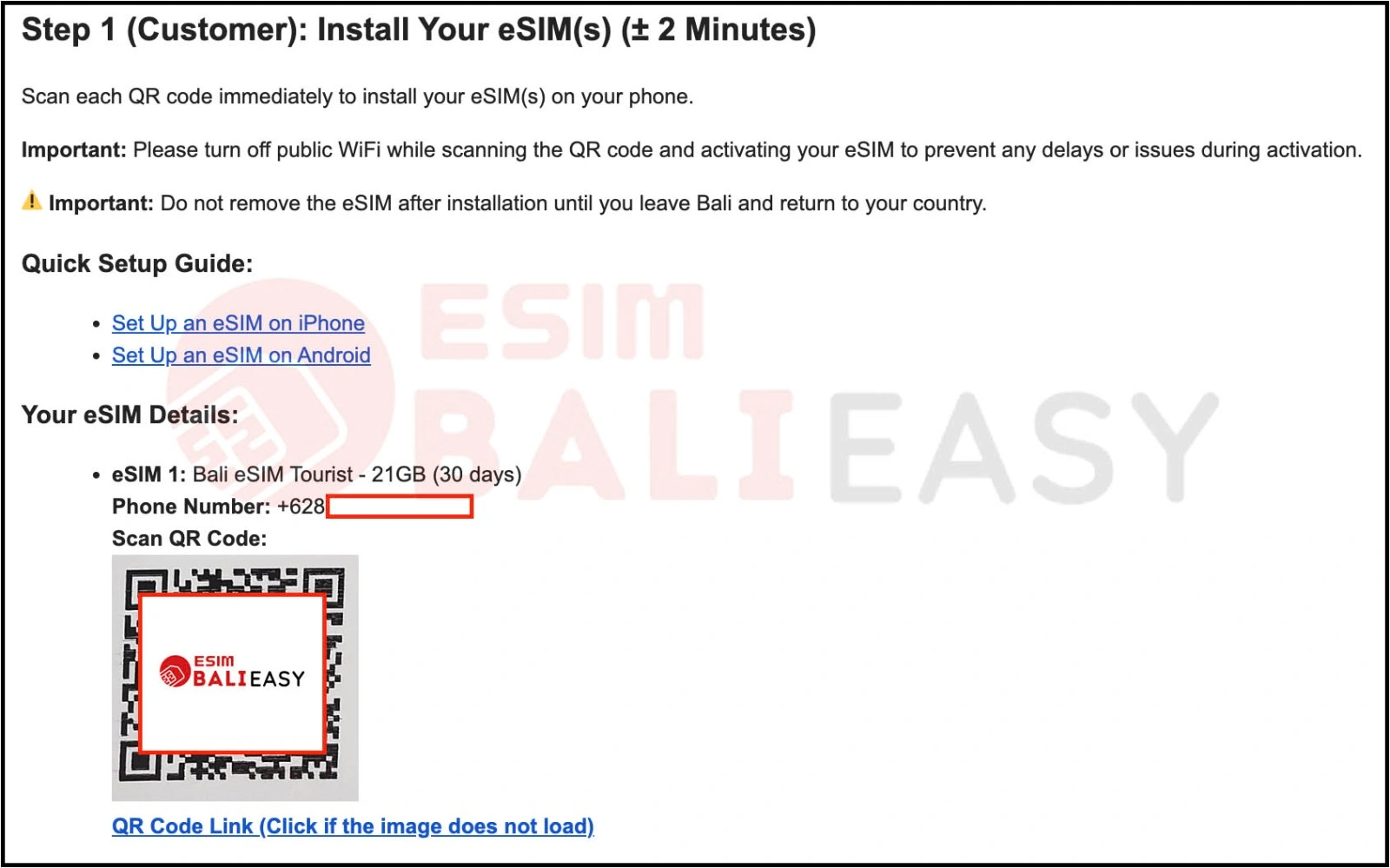
  • Order Number Email: This email contains your order number and an overview of your eSIM details.
  • eSIM QR Code Email: This is the most important email.
    It includes:

    • Your Telkomsel phone number
    • A QR code for eSIM activation
    • A link to the KYC (Know Your Customer) form that you need to complete for registration.


Step 4: Install Your eSIM

How to Order and Install eSIM from BaliEasy QR


  • Open the email and scan the QR code using your phone to install the eSIM.
  • If you cannot scan the code (for example, if you have only one device), you can manually install the eSIM by following these guides:

Important Tip: Avoid scanning the QR code while connected to public WiFi. This ensures that there are no issues during the installation.

Don’t Remove the eSIM: Once installed, keep the eSIM on your phone until you leave Bali and return to your country. Removing it prematurely may cause network issues.
 

Step 5: Complete Your KYC (Know Your Customer)

How to Order and Install eSIM from BaliEasy KYC

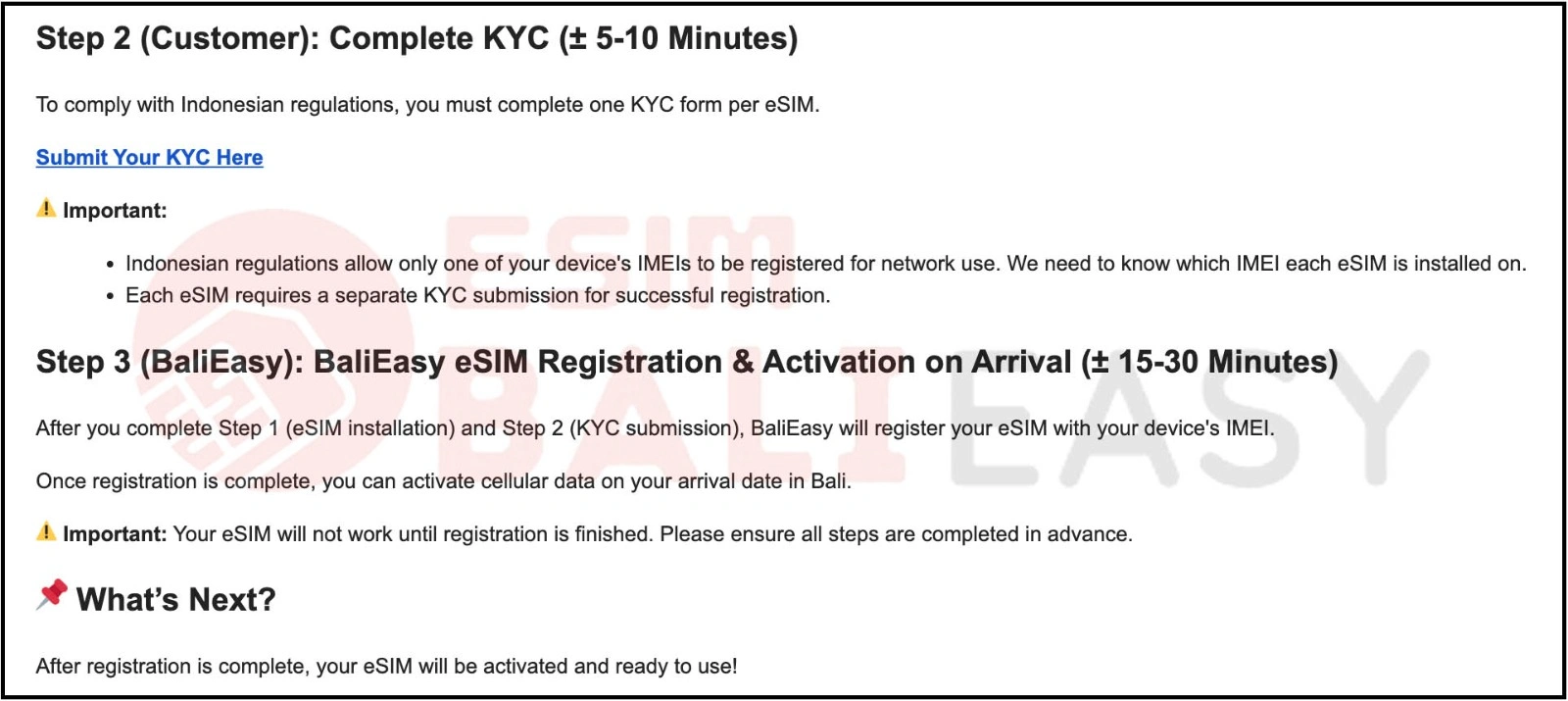
To complete your eSIM registration with the Indonesian network, click the KYC form provided in your eSIM QR code email. You will be asked to submit:

Why IMEI Registration is Important:

Since 2022, Indonesia requires all foreign phones to register their IMEI with the local network provider, such as Telkomsel, for proper connectivity.

For more information on this, check out our guide on Registering Your IMEI in Indonesia.


Step 6: Wait for BaliEasy to Register Your eSIM

Once you have installed your eSIM and completed the KYC form, BaliEasy will register your eSIM with Telkomsel. Your eSIM will not work until registration is complete, but once it’s processed, you can enjoy seamless data and calls upon arrival in Bali.


What You Will Get by Buying eSIM from BaliEasy

  • Local +62 number: A local phone number is essential for receiving SMS, OTPs from apps, and calls. It simplifies communication and access to Indonesian services.
  • Free local calls: Enjoy 25 minutes of free local calls to Indonesian numbers, making it easier to stay in touch without worrying about additional charges.
  • No hidden fees: BaliEasy offers transparent pricing with no surprise charges, what you see is what you pay.
  • Human customer support: BaliEasy‘s support team is available to assist you with any issues or queries, providing personalized and responsive help.
  • Refund guarantee: In case of issues with activation or any problems, BaliEasy offers a refund guarantee to ensure customer satisfaction.
  • Get a 20% discount code: In your email, we’ve included a 20% discount code for your next internet/data top-up, so you can enjoy even more savings on your next purchase


Need Help? Contact Us

If you need assistance with your eSIM or have any questions, feel free to get in touch with us.

Email: esim@balieasy.com

WhatsApp: +6281 365 626 111

Share the Post:

Related Posts

Select your currency

Nyepi Day Notice - March 19, 2026

All transactions and purchases operate as normal.

Please note that during Nyepi Day (Balinese Day of Silence) on March 19, 2026:

  • BaliEasy Customer Support response may be slower than usual
  • Telkomsel eSIM registration may experience delays
  • Mobile internet services (Telkomsel) may not be available in most areas of Bali

Thank you for your understanding.

Found a lower price? We’ll refund the difference!

📌 How It Works:

  1. Find a lower price within 48 hours of purchase (same plan, validity, & network).
  2. Email us at esim@balieasy.com with:
    Subject: Lowest Price Guarantee Request – [Your Order Number]
    Proof (screenshot/link) + Order details
  3. Review in 3 business days → If valid, refund processed to your original payment method.